Archives

gravatar

Fun Things To Do While NOT On Facebook

  • Get to school early one day and if you can get into your classroom you can do this. Write out the biggest, most ridiculous assignment on the board. Also include an impossible deadline and huge penalty if they don’t finish the assignment. Watch the look on your classmates face when they come into the class in the morning and realize what is on the board.
  • Bring a rope and a Cowboy hat to a local park, find some geese and have yourself a fun time trying to roping some geese.
  • Do a fake fall – falling down is funny
  • Try to play basketball in a really weird place
  • Act out a skit with multiple at the bus stop, in a bank or some other public place
  • Dress up really weird and walk around the block waving to people you have never seen
  • Fill a condom up with water and leave it on a busy side walk. Observe the results.
  • Freely distribute mini bottles of blowing bubbles in crowded public places
  • Go into the adult section of a video store with a friend and comment loudly on the titles you have seen and the how great the actors were.
  • Go to the library and loudly ask where the erotica section is and how many books you can check out at once. Ask if they have read one of these books and if they can tell you about some of the “good parts”
  • Have your caricature done
  • Order a pizza while you’re at the beach
  • Keep a squirt gun in your vehicle and have it loaded at all times
  • Write down deep questions on the toilet paper in the public bathroom
  • Place a Whoopee Cushion on someone’s chair just as they are sitting down
  • Play flash light tag in a crowded place at night
  • Print up a bunch of “lost pet” signs, instead make signs for a missing grilled cheese sandwich or your imaginary friend Steve.  Tape them up in lots of public places, and make sure people see you doing it.  Be sure to look very sad.
  • Put on a business suit and walk around a toy store playing with the toys really enthusiastically until they ask you to leave.
  • Sit in a large cardboard box on the side of the road with a sign that says, “Why lie? I need a BEER!!”
  • Get involved in a Flash Mob
  • Join a running race while it is in progress – bonus points for pretending to drink beer and smoking
  • Go to a political protest and take a sign that makes absolutley no sense
  • Do a few laps in the next revolving door you encounter
  • Chase things that go by and when people ask you why say “It was shiny”
  • Skip to the grocery store from your car, or ride in the buggy back
  • Stare and gasp up at the sky with your friends
  • Walk down a busy street and then freeze for no reason
  • When the money comes out of the ATM, scream, ” I Won! I Won! Third time this week!”
  • If you find a surveillance camera – just dance in front of it until they kick you out – if that doesn’t work try some naughtiness
  • Have all your friends dress in exactly the same color and go out on the town


Permalink
gravatar

5 Random Questions To Write On Facebook

"How would you describe me in one word?"

"What is your first memory of me?"

"When was the last time I saw you?"

"What would be a good nickname for me?"

"How much wood could a woodchuck chuck if a woodchuck could chuck wood?"

"Why does sally sell seashells by the seashore?"

"Who will you miss the most: Michael Jackson, Farrah Fawcett, Billy Mays, Ed McMahon, or Steve McNair?"

"What is your favorite Michael Jackson song?"

"What is your favorite Chuck Norris Joke?"


Permalink
gravatar

Chuck Norris Facebook Statuses

(Chuck Norris)...

...doesn't read books, he just stares them down until he gets the information he wants out of them.

...doesn't sleep, he waits.

...is the reason why Waldo is hiding.

...doesn't mow his lawn, he stands outside and dares it to grow.

...can slam a revolving door.

...counted to infinity...............TWICE!!!

...can divide by zero.

...is not Politically Correct. He is just Correct. Always.

...can speak Braille.

...knows where Carmen Sandiego is.

...once won a game of Connect Four in 3 moves.

...can do a wheelie on a unicycle.

...can kill two stones with one bird.

...was once wrong, but only because he thought he had made a mistake.


Permalink
gravatar

Fun Things To Do On Facebook Whie Boored

If you want to have a little fun and possibly create some drama on Facebook, you can change your personal information on Facebook. Here are a few examples of this...

1. Keep changing your birthday to the next day and see who keeps wishing you a happy birthday and who catches on.

2. Choose a strange political party as your "political view".

3. Choose a strange religion as your "religious view".

4. Change your relationship status to see who freaks out about it. NOTE: this is probably not wise if you are actually in a relationship.

5. Selected married as your relationship status and choose one of your friends, they will have to confirm it, so in essence you are proposing to them.

6. Under "contact information" change your location to somewhere exotic or strange, so it appears as though you have moved to this place.


Permalink
gravatar

Top 5 Apps For Your Facebook Profile

5) Scrabulous
A game of Scrabble in Facebook. It sounds strange but it’s actually a good idea; Scrabble is a game you play with friends and Facebook is a social site, so it works well, if you have enough friends.


4) Web Presence
Web Presence keeps track of your online identity. If you have a lot of profiles on other sites, or have blogs and write reviews, etc., Web Presence is an easy way to link them to your Facebook profile.


3) Causes
Causes makes supporting causes you care about very simple. You choose the causes and organisations you support and they’re displayed in your profile. It keeps track of the number of members and the money donated. You can make donations, which are processed securely and go directly to helping your chosen causes.


2) Where I’ve Been
A very useful app for anyone who travels, Where I’ve Been creates a map on your profile to show all the places you’ve visited; countries, states, etc. You can also mark places you want to visit.


1) Flixster
Flixster integrates the site of the same name and allows you to rate movies; your profile shows your favourites and you can collect trailers, show which films you want to see, etc. It also compares your ratings with your friends’, so you can see which movies you all like (or hate).


Permalink
gravatar

Fun Things To Write On Facebook

  • 98% of the time I am right, So why worry about the other 3%?
  • Experience is something you don’t get until just after you need it.
  • I wish the buck stopped here. I could sure use a few.
  • If at first you don’t succeed… blame someone else and seek counseling.
  • Transvestite: A guy who likes to eat, drink and be Mary!


Permalink
gravatar

15 Stupied Thins To Do On Facebook

1. Use Facebook mail instead of proper email
Are you silly? When you Facebook mail me, I have to log into my real email to find that I then have to go and log into my Facebook account to read and reply to your message. If you've got my real email address, please use it.


2. Add old friends and then forget about them
This is the biggest social networking crime of them all. How many times has it happened? You haven't seen someone for 20 years; you vaguely recognise their name but not their face. They add you as a friend on Facebook and then after you accept them, you never hear from them again.


3. Adding people you don't even know
It's one thing to add an old friend and then never speak to them. It's another to add anyone whose name you kind of vaguely sort of recognise. It's like that old man in the pub who slaps everyone on the back as if they were old pals, when in actual fact he has no friends, largely because of this habit.


4. Adding single-serving holiday friends
Some people just don't understand that the exchanging of email addresses at the end of a holiday is just a social ritual and is absolutely not an invitation to add you to Facebook and then turn up unannounced at your house three months later.


5. Accepting friend invitations from people you don't know
It's one thing to complain about irritating people adding you on Facebook, but if you accept those invites, you've only got yourself to blame. If you scan through your Facebook friends list, you'll doubtless find a handful of people in there you barely know. It's a horrible realisation - like when you suddenly realise your hand is resting on a knob of someone else's chewing gum underneath a desk.


6. Update Facebook profile when you're supposedly ill
How many times have we seen it? Someone calls in sick in the morning and then updates their Facebook profile minute-by-minute throughout the day, documenting a day of ice cream, chips, video games and jumping on the bed. Get dressed and get to work you lazy hoodwink, or else you'll probably be fired. And it'd be your own fault for adding your boss to be your Facebook friend.


7. Write on a wall instead of communicating privately
The driving force behind the success of Facebook is... vanity. People love the idea that others are watching what they're doing. Tell me this: for what reason would you invite someone to a private party by writing on their wall, other than to show off to all the people on their friends list who you don't want to come? It just makes you look like a tit, so don't do it.


8. Moan in your Facebook status
The most annoying thing that people do on Facebook is to spray their walls with vanity-filled drivel, by posting self-indulgent awfulness in their status updates. "Kerry is sorry how it ended but it had to be done. I love you and will miss you, and I hope you can apologise one day". Oh sod off. If you've got something to say to someone, say it. Don't post it on your wall because no one else is interested, and people just think you're a prat.


9. Other irritating status updates
No, "Dave is" is not an acceptable status update, nor is it original or in any way clever. "Dave just is..." is equally as inexcusable. And "Dave is Dave is Dave" is downright taking the piss. Oh, and song lyrics are also a no-no. "Sandra was happy in the haze of a drunken hour, but heaven knows she's miserable now" will impress people about the same amount as Morrissey's saggy, miserable face.


10. Upload drunken pictures the morning after
Have a little common sense. If you go out for a big one on a Wednesday night, posting humiliating, drunken photos of your friends on Thursday morning is a recipe for disaster. Because when I call in sick at 9am, the last thing I want my boss to say is: "I've seen the pictures of you crawling in the gutter last night. I'm not amused or impressed, now get to work!"


11. Joining ridiculous chain-mail groups
Why do people insist on joining groups such as "On the X of May, everyone has to panic buy carrots"? Come on people, how stupid are you? There's one group on Facebook devoted to nullifying the vegetarian moral crusade, and it's called: "For every animal you don't eat, I'm going to eat three". That's a good group name. "I think Ryan Seacrest is the best presenter ever" is not.


12. Starting said groups
Enough said.


13. Lazy grammar and spelling mistrakes
Reading Facebook is like perusing a six-year olds' English copybook. Come on, people: 'Your' is 'your'. 'You are' is 'you're'. It really isn't hard to get that little one right. And understanding the difference between there, their and they're surely isn't too much of a challenge?


14. Upload photos to Facebook and deleting originals
Uploading photos to Facebook can be a very handy way of sharing your holiday snaps. But for the love of God, don't lose your originals. Facebook is terrible at compressing and resizing images - it turns your 14MP panoramas into 14KB monstrosities. Facebook is not a suitable repository to store your precious photos!


15. Inviting me to be a Zombie Pirate Snot Monster
Please don't do that ever ever again


Permalink
gravatar

1o Things Amazing Developed From Facebook

1.) Facebook Toolbar for Firefox – This application extends the Facebook experience to the browser. You receive automatic notifications of friend requests, new messages, and can check what your friends are up to in the “Facebook Friends Sidebar” feature. The toolbar also comes with the “share” link which allows you to quickly import and share any web site with your Facebook friends.
Facebook Toolbar


2.) rendezbook – Serving as an anonymous “MeetMe @ HotOrNot” type service, rendezbook lets you identify Facebook friends as someone you a) would like a stronger friendship with b) would like to date or c) would like to have a “random fling” with. Your preferences are anonymous, until of course the person you desire indicates the same feeling. The homepage claims more than 1,700 users so far, with a surprising 200+ matches already. I have left all boxes unchecked in this example :) :
Rendezbook


3.) CampusRank – This site allows you to nominate people in the type of categories you might expect to find in a yearbook – Best Smile, Campus Clown, and even “Metrosexiest.” The service doesn’t appear to have a whole lot of traction yet, but perhaps they’re just waiting to show off users once they have more nominees.
Campus Rank Screenshot


4.) Friend Analyzer – This tool shows you which of your friends are most similar to you in a variety of categories. You can also see what the most popular items are in your network. It appears that I have rather feminine taste in music:
Friend Analyzer


5.) College-Roomies – This service lets you search for other students looking for a roommate at your school. In addition to being able to check out the Facebook profiles of other students in search of housing, there is a cool split screen feature where you can see housing preferences (for example, cleanliness, smoking habits, etc.) that prospective roommates that they have filled out on the College-Roomies site:
College Roomies


6.) Your True Self– This site is built around the premise that “your friends say a lot about you.” It analyzes your friends’ political views, favorite movies, music, television shows, and books to guess at things that you might like. For example, 5 of my friends like Family Guy, so Your True Self indicates that I might like it:
Your True Self


7.) The Friend Match – This service randomly pairs up two of your friends and allows you to rate on a 5 star scale how good of a dating match you think they make. If someone has matched you with someone else, you can see it under “My Matches.” I’m pulling a big goose egg so far.
Friend Match


8.) FbCal.com – The Facebook Birthday Calendar Generator creates an iCalendar (.ics) file with your friends and their birthdays that can be imported into iCal, Sunbird, and Google Calendar. For Outlook users, there is the Facebook Birthday Exporter.
fbcal


9.) Facebook to Twitter – Facebook and Twitter in the same application? How have these guys not received millions in VC funding already!? :) In reality “FT” will save you maybe 37 seconds per year, as you need to point to the fbtwit.com site each time you want to automatically post your Facebook status to Twitter. Additionally, Facebook recently added the ability to update via SMS, so it’s unlikely many Facebook users will care much about updating Twitter with the same status message.
Facebook to Twitter


10.) Votetronics – This simple voting application allows you to setup a poll that only your Facebook friends can participate in. It seems like this would be an easy and logical feature for Facebook to add to the main service, as polls and surveys are always popular on social networking sites.


Permalink
gravatar

Things You SHOULD KNow About Facebook


If you have a computer, you’re probably on Facebook. You’re networking with friends, adding personal details, storing your email address & cell phone number, uploading pictures, and much more.
But have you bothered to read Facebook’s Terms of Service (“TOS”) or Privacy Policy? What legal relationship have you agreed to? Who has access to your data and personal details?
Thanks to Chris Brogan, I started asking these questions. Then I waded through their terms and policies. Here are some things I found.

1. The terms can change any time

This is probably standard for a website’s TOS, but this disclaimer jumps out toward the top of Facebook’s TOS:
We reserve the right, at our sole discretion, to change, modify, add, or delete portions of these Terms of Use at any time without further notice.
Since the rules can change at any time, you’re deemed to accept those changes by continuing to use the site. Even if you didn’t know of the change. Yeah, you’re the little guy in this relationship.

2. Personal use only

LinkedIn is all about jobs and business. MySpace is full of profiles for companies and products. But Facebook is supposedly only for personal use:
You understand that except for advertising programs offered by us on the Site (e.g., Facebook Flyers, Facebook Marketplace), the Service and the Site are available for your personal, non-commercial use only.
That theoretically means that only actual people can create profiles. And you’re not supposed to profit from it. But lots of charitable organizations have profiles, which doesn’t seem to fit the “personal” requirement to me. But be especially careful if you’re thinking of creating a profile for your business; you might get banned.

3. A single, individual user account

Along the same lines, every user account is supposed to be tied to an individual person, not a group:
In addition, you agree not to use the Service or the Site to: … register for more than one User account, register for a User account on behalf of an individual other than yourself, or register for a User account on behalf of any group or entity;
This also means that you can’t have two accounts on Facebook, in case you wanted to keep your alter-ego separate. Too bad.

4. You’re giving up a HUGE license

Facebook thrives (in part) because of the content users post there. But did you know that posting content gives Facebook a license to do whatever they want with your content?
By posting User Content to any part of the Site, you automatically grant, and you represent and warrant that you have the right to grant, to the Company an irrevocable, perpetual, non-exclusive, transferable, fully paid, worldwide license (with the right to sublicense) to use, copy, publicly perform, publicly display, reformat, translate, excerpt (in whole or in part) and distribute such User Content for any purpose on or in connection with the Site or the promotion thereof, to prepare derivative works of, or incorporate into other works, such User Content, and to grant and authorize sublicenses of the foregoing.
In plain English, this means you’re giving up copyright control of your material. If you upload a photo to Facebook, they can sell copies of it without paying you a cent. If you write lengthy notes (or import your blog posts!), Facebook can turn them into a book, sell a million copies, and pay you nothing. This deserves careful consideration!

5. Applications are NOT guaranteed safe

You might think that Facebook is watching your back with the security of third-party applications. You’d be wrong:
[W]hile we have undertaken contractual and technical steps to restrict possible misuse of such information by such Platform Developers, we do not screen or approve Developers, and we cannot and do not guarantee that all Platform Developers will abide by such restrictions and agreements.
In other words, “installer beware.” A malicious application developer could break through Facebook’s security protocols and expose your info. That would probably be difficult to do, but Facebook wouldn’t have to take the blame.

6. Disputes are arbitrated under Delaware law

If Facebook does something horridly wrong and you want to sue, guess what? You can’t (for most claims). You’ve agreed to “final and binding arbitration” for resolving most disputes with Facebook. I’d quote the language here, but it’s only interesting to us law geeks.
Suffice it to say, you probably won’t have a day in court with Facebook. If you did, it would be in California (required by the TOS), and the court would follow Delaware’s laws. That’s typical lawyering. :)

7. You surrender all submissions

Ever had a thought for a better Facebook? If you send it to them, it becomes their property:
You acknowledge and agree that any questions, comments, suggestions, ideas, feedback or other information about the Site or the Service (“Submissions”), provided by you to Company are non-confidential and shall become the sole property of Company.
This is probably typical of a large company. But you might not send them your latest award-winning idea. If you have something really great, keep it under wraps. Heck, maybe come up with a formal business proposal and some way to skirt this legal term.

8. Privacy is NOT guaranteed

I’d think twice before posting really private things on Facebook. From their Privacy Policy:
[W]e cannot and do not guarantee that User Content you post on the Site will not be viewed by unauthorized persons. We are not responsible for circumvention of any privacy settings or security measures contained on the Site.
If somebody hacks Facebook, steals all your content and contact info, then does something nefarious with it, you have no remedy against Facebook. The hacker would definitely be in trouble, but Facebook is the deep-pocketed corporation.
Besides, Facebook’s own third-party contractors might misuse your information:
We may provide information to service providers to help us bring you the services we offer. … Where we utilize third parties for the processing of any personal information, we implement reasonable contractual and technical protections limiting the use of that information to the Facebook-specified purposes.
But most importantly, Facebook doesn’t guarantee your privacy:
Please keep in mind that if you disclose personal information in your profile or when posting comments, messages, photos, videos, Marketplace listings or other items , this information may become publicly available.
If a company laptop is compromised, and all your personal data gets stolen, tough luck. You were warned.

Anything else?

The Terms of Service and Privacy Policy for Facebook are long. I’ve only covered a few points that really jumped out at me.
Do you have anything to add? Also, if you think I misunderstood something, please correct me.


Permalink
gravatar

17 Things About Facebook!

It’s not a computer virus, but for some Facebook members, it’s starting to feel like one. It’s called the "25 random things, facts, habits, or goals about you," and it seems all the kids are doing it. The Facebook notification pops up in your e-mail or Facebook "wall" with instructions to list these 25 things and tag 25 of your own “friends” to do the same.
The only thing lacking in this dubious invitation is the dire threat of a chain letter — that failure to comply means certain death in say, the next 25 days. Well, turnabout is fair play. Let's see how YOU like it, Facebook!


1.  Facebook fosters the illusion that every person you know actually cares that you left your Nikes in the locker room at Crunch.


2.  Nobody cares that you left your Nikes in the locker room at Crunch.


3.  If you join Facebook to find out what your kids are up to, you might actually find out what your kids are up to.


4.  You don’t want to find out what your kids are up to.


5.  Unless, of course, you want to find photos of your 19-year-old daughter making out with another 19-year-old coed for the edification of a bunch of 19-year old dudes doing beer bongs. (That’s age 19, if you’re lucky.)


6.   You can announce your divorce on Facebook via the heart icon thingy .


7.   Don’t announce your divorce on Facebook.


8.   Don’t announce your divorce on Facebook for a number of reasons, the least of which is that all your "friends" will respond on your "wall" with sympathies that in a different era would've been delivered in privacy. You wouldn’t console somebody by shouting across a room full of people. Why are you doing it on a Facebook "wall?"


9.   You people take Facebook way too seriously.


10.  A woman was killed after changing her relationship status on Facebook.


11.  Remember that Burger King "Whopper Sacrifice" application that allegedly offered a free Whopper coupon for every 10 friends you dumped? Well, you probably shouldn’t have dumped a couple of your oldest friends, two of which are hardcore vegans. At least one of them didn’t find it hilarious at all and now they won’t “re-friend” you.


12.  If you join Facebook to find people you used to know , you’re just as likely to find your middle school BFF Jill as you are to reignite the passions of that one guy from Photography class who has been stalking you since junior college.


13.  "Don’t Get Botox"


14.  Facebook can get you fired. Yes, you . Just like you are not that one person who can drive safely while talking on a cell phone, you are not that one person who is in no danger of getting fired for something stupid posted by or about you on Facebook.


15.  What’s more, your boss is on Facebook. If you join, you’re going to have to decide whether to accept his or her "friendship." If you accept, you risk losing your job for something he or she stumbles upon. If you attempt to play it safe by not accepting your boss’s "friendship,"  you risk losing your job for offending him or her.


16.  Oh, and you’re also at risk of alienating your oldest friends by bumping their rank in your "Always show these friends" box. We’re talking your adult friends, like, in their 30s and 40s, with jobs and kids and all kinds of grown-up responsibilities.


17.  Your otherwise grown-up friends are angry at you for bumping their "Always show these friends" rank because obviously you’re trying to communicate some kind of super secret Facebook message along the lines of, "I value your friendship two-people less today than I did yesterday." It’s like watching your friendship stock plummet.


Permalink
gravatar

Funny Face Book Facts, Nothing to do on Facebook

  1. Facebook has over 350 million active users. More than 35 million users update their status each day, with more than 55 million status updates each day.f
  2.  More than 2.5 billion pictures are uploaded to Facebook each month.f
  3. The average Facebook user has 130 friends and sends eight friend requests per month.f
  4. Among children under 18, Facebook was ranked third in the top 100 searches of 2009, behind YouTube and Google. Sex and porn rounded out the top five searches.ae
  5. A recent survey of 500 top colleges found that 10% of admissions officers acknowledged looking at social networking sites such as Facebook to evaluate applicants. Thirty-eight percent of admissions officers said that what they saw negatively affected the applicant.i
  6. Facebook is not only beating MySpace traffic, but it is also the second-ranked site overall in the U.S. behind Google.x
  7. Americans spend 13.9 billion minutes a year on Facebook and five billion minutes on MySpace.x
  8. In 2003, Harvard student Mark Zuckerberg created Facemash, where he placed photos of undergraduates side by side so viewers could rank which one was “hotter.” Zuckerberg would later turn Facemash into the now ubiquitous Facebook.m
  9. legs in bed
    A woman slept with 50 men she met on her Facebook page titled “I Need Sex”
  10. In 2008, a 23-year-old woman named Lauren Michaels created a group titled “I Need Sex” on Facebook. Within 10 minutes, she had 35 members and soon attracted 100—50 of whom she eventually slept with. Facebook has since removed her page.e
  11. An 18-year-old Wisconsin man posed as several different girls on Facebook to blackmail underage male teens into performing sexual favors by coaxing them to send nude photos of themselves. He could be facing up to 300 years in prison.ac
  12. Beacon, part of Facebook’s controversial advertisement system that broadcasted information about a user’s shopping activity on other sites, was the target of a class action lawsuit in 2009. The resulting settlement required Facebook to pay $9.5 million into a settlement fund.l
  13. If Facebook were a country, it would be the fifth-largest country in the world, after China, India, the U.S., and Indonesia.ag
  14. In 2009, an EMT at the crime scene took a cell phone picture of the body of a New York woman who had been strangled and beaten and then posted it on his Facebook profile. He was later arrested on charges of official misconduct and was fired from his job.t
  15. The head of the Catholic Church in England and Wales warned that Facebook and MySpace can lead children to commit suicide because such sites encourage teens to build transient relationships and dehumanize community life.af
  16. Facebook includes eating disorder groups such as “Get Thin or Die Trying,” and “Quod me nutrit me destruit” (“What nourishes me destroys me”). While such eating disorder sites were typically anonymous on the Web, their growing presence on Facebook makes them more public and accessible to more people.h
  17. The New Oxford Dictionary announced that the 2009 Word of the Year was “unfriend,” as in “to remove someone as a friend on a social networking site” such as Facebook. However, there is some debate whether the word should be “defriend” rather than “unfriend.”l
  18. A 39-year-old Pennsylvania father was arrested for openly asking his 13-year-old daughter for sex over Facebook.o
  19. While stressing that correlation does not equal causation, a recent poll suggested that Facebook users have lower overall grades than non-users.m
  20. While initially created for college students, Facebook users over the age 26 now represent 60% of the total U.S. Facebook population.a
  21. teenagers computer
    The average user spends more than 55 minutes a day on Facebook
  22. The average Facebook users spend more than 55 minutes a day on the site. They use the Like button nine times a month and write 25 comments each month.f


Permalink
gravatar

Some Fun Things To Write As Status On Facebook

  • I think my girlfriend has had sixty-one boyfriends before me. She calls me her sixty second lover.
  • 2 in 1 people are siamese.
  • I’d call you a tool, but even THEY serve a purpose.
  • I’m mad as hell, and likely to take it indefinitely!
  • Give me ambiguity or give me something else!


Permalink
gravatar

Dear Readers!

Hello my fellow readers, now I'm going to be nice and give you a e-book on how to earn money online for free.
That's right I'm giving it to you for free.

Download HERE!

And there you go, you got yourself an e-book on how to make big money online.
 Well, get to work!


Permalink
gravatar

Why YOU Logged In To Facebook Today

Facebook has enjoyed boasting about their highly active users over the past few years. One statistics that they often state is that 50 percent of “active users” log in to the site on a daily basis. Facebook has most definitely changed the way we interact with each other and for many it has become heavily integrated into our daily lives. I decided to compile the top reasons that users log in to the site and have posted them below.


1. Stalk People


Let’s be honest, there are many motives behind connecting with others and on Facebook one of those primary motives is to stalk people! One of the best things about Facebook’s stalking features is that they are about to be upgraded! With the real-time news feed, you will be able to see a lot more about what your friends are doing in real-time. So go ahead, stalk your friends and don’t worry because they’ll never know!


2. Share Photos

-Facebook Photos Icon-Facebook is now the largest photo sharing site on the web. The main reason for this growth is the ability to tag your friends in photos. While social tagging has been around before Facebook, tight integration into the social graph has proven to be extremely powerful. It also naturally improves your ability to stalk people given that they are constantly being tagged by others (yes, you can prevent being inappropriately tagged as I outline in the Facebook privacy guide).


3. Play Addictive Games

-Pet Society Icon-When Facebook opened their platform two years ago they weren’t expecting the site to become the central platform for the future of social gaming but soon enough it was. The most popular application on the site based on daily active users is Pet Society and overall, a large percentage of the top 100 applications on Facebook are games. If you are on Facebook, there’s a good chance that you have played a game in the past month and many more are playing daily.


4. Advertise Your Business

-Facebook Ad Targeting-While Facebook’s advertising platform is still in its infancy, many businesses are taking advantage of the site’s ability to efficiently target users based on specific demographic information. Many of the advertising opportunities are still being explored including “nanotargeting” which is the ability to target a single user via a Facebook advertisement.


5. Monitor Your Children

The fastest growing demographic on Facebook over the past few months has easily been parents, more specifically: mothers. Facebook can be a parent’s dream come true. While the site can occasionally provide parents with more information than they ever wanted, Facebook can also be used to increase communication between parents and their children.


6. Meet Other People

While Facebook is supposed to be for connecting with those that you’ve meant offline, the launch of the Facebook platform brought about a number of applications which have served as powerful tools for connecting previously unconnected users. Some of these applications are for meeting fellow singles to date while others are for connecting within virtual communities. However you are connecting with others, Facebook is rapidly spawning millions of new relationships.


7. Create An Application

-Facebook Developers Icon-While everybody isn’t a developer, Facebook has been extremely effective at attracting new developer talent to build applications on top of the Facebook platform. Facebook initiated the movement toward a more open social web with the launch of their platform two years ago, and they are continuing that movement today. The result has been numerous applications which now are legitimate businesses for hundreds if not thousands of developers.
Many more developers have attempted to build powerful applications on top of the Facebook platform, and despite their failure to attract a mass following, the opportunity provided to developers is frequently too good to pass up.


8. Check Tagged Photos

-Tagged Facebook Photo-Embarrassing photos have become a permanent fixture in the media when referencing Facebook. Thanks to the large amount of buzz resulting from articles about individuals being fired and relationships ending due to inappropriate or compromising photos, millions of users log in soon after they are alerted to a newly tagged photo of themselves.


9. Reply to Messages

-Facebook Inbox-Facebook is a communication platform and messages are a central component of that communication. Every time we receive a message, an email arrives in our inbox to notify us of that message. Many users (including myself) have complained about the lack of features within Facebook’s messaging system. Despite its downfalls, Facebook messages are one of the most important features of the site.
With the growth in mobile Facebook usage, Facebook’s messaging system has witnessed continued growth and we can only assume that this growth will continue for the foreseeable future.


10. Search For Old Friends and Ex-Lovers

-Facebook Search-Often times we log in to Facebook just to find a person we happen to be thinking of at that moment. It can be an ex-girlfriend or ex-boyfriend, as well as a childhood friend, or even a distant relative. Whoever you are thinking about, you can log in to Facebook and search for that person. More often, that person now has a profile on Facebook. You can find most people that you’re looking for on the site and that’s why millions of people are logging in every day.


11. Chat With Others

-Facebook Chat Icon-Facebook chat only launched recently but every day that I log in, I end up getting tons of messages (as long as I’m not invisible). From other people that I’ve spoken to, chat has become an increasingly active component of their Facebook usage. As I said before, Facebook is a communication platform and chat is now an integral component of communication on the site.


12. Update Your Status

-Facebook Status-Status has been an important component of Facebook since early on and with the increasing popularity of Twitter, status is becoming even more important. Users don’t actually need to visit the site to update their status though. Many use their mobile phones to update their status and then wait for the comments to flow in. Status updates were created by Facebook and are now becoming an integral component of general communication on the web.


13. Take A Break

In the world of the cubicle workplace, we often are seeking for ways to take a break from performing the task at hand. According to some statistics Facebook has single handedly resulted in an overall decrease in domestic productivity as well as abroad. Regardless of the productivity impact, it’s clear that workers are using Facebook during their downtimes and any time they wish to take a break.


14. Converse With Customers

More important than how you are wasting time is how you are making money and Facebook is a great platform for doing that. Through Facebook Pages, brands have the opportunity to interact directly with their customers, engaging them in a two-way dialogue. I believe that over the next few weeks and months we will see a surge in Facebook Pages adoption as new services arrive to make it easier to build a presence. This is just one of the many reasons users log in to Facebook!


15. Figure Out Your Event Schedule

-Facebook Events Icon-If you have a lot of friends on Facebook then you probably have a lot of event invites. Whether or not you are attending them, Facebook has become a central location for finding out what events or taking place on any given day. One of the main reasons we log in to the site daily is to figure out what’s going on and what events our friends are going to. If you are on Facebook, then you are most likely creating and RSVPing to events.


16. Create Buzz

Guerilla social media marketers (or whatever you want to call them) have a heavy presence on Facebook and are actively trying to figure out new ways to increase their reach through the site. Whether it’s finding more friends, posting more status updates, creating fan pages, purchasing ads, setting up events, tagging users in photos, or anything else, many users perform certain activities for the sole purpose of generating buzz.


17. Participate or Create Groups

-Facebook Groups Icon-Groups are the central place for organizing large numbers of users together around a single purpose on Facebook. Many times groups will surge beyond thousands of users and suddenly there are ongoing conversations that are formed. Users that participate in these conversations return regularly to talk with other users about the topic being discussed in that group.


18. Approve New Friend Requests

Adding friends is one of the most important parts of the Facebook experience. The average user has somewhere around 150 to 200 friends and logs in every time they receive a new friend requests. Without friends on Facebook, the experience would be a pretty poor one which is why the company attempts to suggest new friends as soon as users register, increasing the likelihood that they’ll become an active user.


19. To Check Application Requests And Notifications

-Facebook Requests Icon-When the Facebook platform first launched almost two years ago, application requests began flooding in. The primary reason behind this flood of requests was that there were no limitations on how many applications could send. Despite the eventual limitations that were enforced, application requests and notifications continue to fill up within users’ “request” area. Cleaning out your requests is a good reason to log in every day.


20. Check Birthdays and Send Gifts

-Facebook Birthday Gift-Facebook has become a central location for checking up on our friends’ birthdays. Rather than storing birthdays in your calendar, you can simply log in to Facebook and check out who’s birthday it is. You can then be one of the hundreds of people to post “Happy Birthday!” on their wall. To stand out from the rest, you can even send them a gift. Birthdays continue to be one of the most important reasons people log in to Facebook everyday.
So what was the reason that you logged in to Facebook today?


Permalink
gravatar

Change To "Pirate Enlish"

With two simple clicks you can Translate Facebook into Pirate English for a good laugh.
To make the change while logged into Facebook simply go to the footer in the bottom left hand corner of the screen, and click on the English language link:
Two Fun Facebook Tricks
Once you click this link a pop-up menu will appear and you can select “English (Pirate)” and change your language to pirate english!
Two Fun Facebook Tricks
After making this change your Facebook Profile will look something like this:

Two Fun Facebook Tricks
Instead of “Logout” the Pirate translation is “Abandon Ship.”  Instead of “Share” the translation says “Divvy spoils t’ all ye mateys.”  Yeaarr-harr-harr!


Permalink
gravatar

Download Youtube And FAcebook Videos!

Have you ever liked a video shared by your friend on facebook and wanted to download it…Well this this tutorial is not only for facebook or youtube instead it can be used for any video streaming website like metacafe,dailymotion,veoh or yahoo videos.There are websites on the internet that will convert your video link into a download link but it has the following drawback
  • If you already watched the whole video and then you decide to download it to your computer it will take double time becuase you already have spent time watching it and now have to spend time downloading it to your hardrive.
  • Moreover, the download speeds are very slow and its very irritating to download the whole video again.
But if you have already played the whole video on the site then there is no need to waste the time on downloading it again.We simply have to locate the cache folder of the browser as when the video is streamed it is automatically saved in the cache folder and just have to copy paste the video file from cache folder to your desired location in your computer.

Before reading this tutorial make sure that you have uncheck the hide files and folders.

Here is the step by step tutorial with screenshots on how you can locate the cache folder for various browsers in various operating systems


Case 1:Google Chrome
For windows Vista and Windows 7

If you use google chrome in windows vista or windows 7 then here is the location of the cache folder
C:\Users\USER_NAME\AppData\Local\Google\Chrome\UserData\Default\Cache

C, being the system root. If you are not sure about the system root you can replace C: with %systemroot%.
Also donot forget to replace USER_NAME to your windows username

For Windows Xp Users
In windows Xp the google chrome cache folder can be found at
C:\Documents and Settings\USER_NAME\Local Settings\Application Data\Google\Chrome
CASE 2:Mozilla Firefox

For Windows 7 and Windows Vista
The temporary cache folder can be located at
C:\Users\USER_NAME \AppData\Roaming\Mozilla\Firefox\Profiles

For Window Xp Users
The temporary cache folder can be located at
C:\Documents and Settings\USER_NAME \Local Settings\Application Data

CASE 3:Internet Explorer
In case of Internet Explorer you need to go to Tools>Internet Options and then in Genreal tab click on Settings button


94664744 How To Download Facebook or Youtube Videos Without Any Tools


A new window will popup in front of you now click on View Files button.


23571787 How To Download Facebook or Youtube Videos Without Any Tools

How To Find Your Video In Cache Folder

Once you have found the cache folder of your browser the next thing you have to do is locate your video file.To do this arrange the files of the folder according to their size because video files are usually large in size.Open the largest files with Vlc player.Once you have found your video just copy it to your desired location.

Note:There are usually Some data files with names like data_1 in cache folder.Donot open them with Vlc open the rest of the files with Vlc and you will easily find your video.


Note:Make sure that you replace the USER_NAME with your windows username in the above addresses


Permalink

gravatar

Themes On Facebook!

Orkut gives you the option to change your profile theme but world’s most popular social networking website doesn’t provide you the ability to change theme of your profile.
In one of my my earlier post I gave you the trick to change colour of facebook using Facebook Colour changer. Now I am giving you something more i.e Trick to /Change themes on facebook and 45 beautiful facebook themes.If you are using facebook colour changer script then disable it from greasemonkey before using this Facebook theme trick.
This trick has following requirements

  • Mozzilla firefox browser
  • Stylish Addon
So here is the complete tutorial on how to install themes on facebook
1.     Open firefox browser.If you donot have you can download it here
2.     Now Download Stylish addon for firefox by clicking here.
3.     After installation is complete restart your browser
4.     Install the theme below by clicking on the image
5.     To switch between the themes you have installed on your firefox browser goto Tools>Addons>Stylish and disable all other themes except the one you want.

If you want ALOT more themes you can downlaod HERE!


transparent Green colour 2009 theme

transparent Green colour 20%5B7%5D Trick To Install/Change Themes on Facebook with Stylish

windows Green black transparant

windows Green black transpa%5B6%5D Trick To Install/Change Themes on Facebook with Stylish

Note:-The themes will be visible on your own Firefox browser only.


Permalink
gravatar

If you are really boored...

There is a lot more to Facebook than just photo sharing and chatting with friends or family members. There are many applications (commonly called "apps"), groups and fan pages to make the experience even more fun. If you want to get more out of your Facebook experience, you will need to know how to search for and add applications, groups and pages to your account.
  1. Searching For Applications, Fan Pages Or Groups

    • When you are logged into your account, type the name of a person, band or thing that you like into the white search bar in the upper-right hand corner of your home page and hit enter. You will be taken to a results page featuring groups, fan pages, and applications that match your search.
      Look through them and decide which ones interest you. Click on the logo after reading the description to add it to your profile. Do not add more applications than you can keep track of, as they can quickly build up to an unmanageable amount. Many of the applications require daily use to be effective. For example, farming games require you to plant and harvest before your crops go bad. Most of the games work this way, operating in "real time."

    Having Fun WIth Facebook

    • Play games on Facebook with friends that are interested in the same games. It becomes quite a race to see who can "level up" the quickest. There are also other fun applications like quizzes where you can compare results with your friends. Some of them are quizzes about your friends, others are similar to those you'd find in the back of a magazine such as "Which Hairstyle Fits Your Personality" or "How Many Kids Should You Have?"
      Become a "fan" of anything you like to share some things about yourself that your friends may or may not know. There are fan pages for almost anything from bands or musicians to peanut butter. Join groups to converse with others who may not be on your friend list, but share similar interests. There are many groups on Facebook, and they include almost anything you can think of, the same way fan pages do.

    Inviting Friends To Join Groups, Become Fans And Add Applications

    • Invite your friends to applications that you know that they would enjoy, but do not overdo it. Requests to add these games, "apps" and fan pages can be quite annoying to your friends if they are not interested in the kind of invites you are sending. A more polite approach would be to post a request on your own wall, so your friends can see what you are doing, and choose if they want to join you or not.


Permalink
gravatar

Take Random Pictures With Your Webca,

Take Random Webcam Pictures

If you have been on Facebook for some time, you have probably seen a friend or two post random pictures of them and their friends taken with their computer webcam. Its really easy to do and can provide quite a few laughs. Just get some friends, a webcam, and some creativity and you are ready to go. You can play around with any software you have with your webcam that allows you to change things such as hairstyles, clothes, and accessories. Chances are you can also play around with several effects that will allow you to warp the picture in various ways. Hopefully this little article has sparked some creative ideas of posting random webcam pictures on Facebook.


Permalink
gravatar

Some Wierd Facebook Facts

Some cool and interesting facts about Facebook:
1. 60+% of people online use Facebook to stalk their ex! Now are you one of them?
2. Close to a billion photos uploaded on Facebook every month! I’m sure many of these pictures are taken just to post on Facebook.
3. More than 300 million active users on Facebook! You’re not alone!
4. 30+ million profiles have their status messages updated at least once every day. Here’s a link to some funny facebook status messages.
5. 70% of college students on Facebook log in every single day, that’s no surprise now, is it?
6. Facebook deletes accounts of mothers or anyone who posts pictures of breastfeeding. So you want to be careful now about the pics you think of putting up!
7. Facebook deletes accounts with strange sounding names like “Leboe”, “Allien”, etc. Guess it’s do with their policy of not allowing fake accounts and them thinking these are not valid names?
8. There’s something known as a Facebook Addiction Disorder (FAD)! Wonder how many of you suffer from that?
9. Founder of Facebook, Mark Zuckerberg, is the world’s youngest billionaire! Mark’s surely made money off all of us.
10. Syria has banned Facebook (it’s a country [for those that don't know]), apparently to prevent an uprising of sorts by people getting together.
11. Facebook has ruined the careers of many a politician. More details about the political facebook scandals can be found here.


Permalink
gravatar

Show On your Wordpress Blog Your Facebook Status

If you want to show your Facebook Statuses and you are hosting on a WordPress.com blog that restricts you from installing plugins, try this. The following method make use of Facebook status feed and WordPress RSS widget. It will also work for self-host WordPress blogs, but you guys who self-host can use better plugins for that.

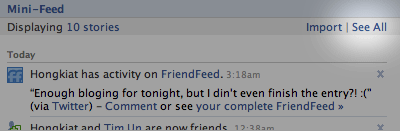
Step 1

Login into Facebook. Under Profile, look for Mini Feed column, click on See All.
minifeed seeall How to Display Facebook Statuses on Wordpress Blog

Step 2

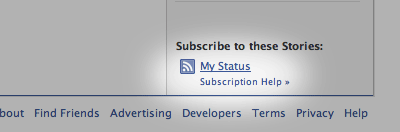
Under Mini Feed, click on ‘Status Stories‘ on the right column. Scroll all the way to the bottom, look for ‘My Status
my status How to Display Facebook Statuses on Wordpress Blog

Step 3

Copy the link of My Status, and we are about to use this in WordPress blog. Your link will look something like the following:
minifeed link How to Display Facebook Statuses on Wordpress Blog

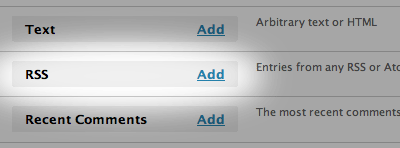
Step 4 (WordPress)

Under WordPress admin, Navigate to Design -> Widget. Look for RSS Widget, add it to your side bar.
rss widget How to Display Facebook Statuses on Wordpress Blog

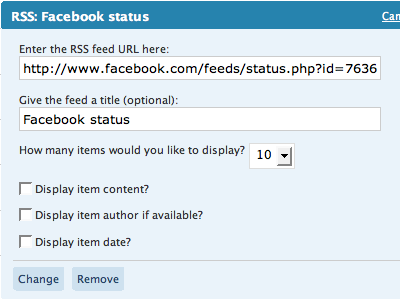
Step 5

Paste the copied URL inside, give it a name, save and your Facebook statuses (or status depends on how many you display) will now appear on your WordPress blog.
rss facebook How to Display Facebook Statuses on Wordpress Blog


Permalink
gravatar

Offline Mod On Facebook

If you are connected with too many people on Facebook and need to hide your online status on Facebook Chat from certain contacts, here's some help.
hide in facebook chat
Facebook has integrated friends list with Chat and you can also choose which of these list members get to see you online.
go offline chat
So you can stay visible to your family members and close friends while the rest of your Facebook friends won't know if you are logged into Facebook.
Earlier you had to completely turn off Facebook chat in order to hide your online status from other contacts.
The Facebook chat window has easy sliders so you can easily toggle your online status for any friends list in a click


Permalink

Tramadol